Signing up to Legacy Share
Legacy Share is a free service/app to share & store your last wishes. It helps start the conversations that are normally left too late and talk about your funeral arrangements. This gives you and those you care about peace of mind. All you need to sign up are:
- Name
- Password
Once you have signed up, you are ready to begin.
Getting started
The first section you will start with, will ask you about your base requirements. If you're not sure about what you'd want, just select an answer that is what you think right now, as you can change your answer later. Some of the answers you give here will be followed up on following sections.
What sort of funeral would you opt for in your legacy?
This will ask what you would like doing with your remains. You can choose from;
- Burials
- Cremation
- Resomation
- Burial at sea
- Give your body to science
For Burial, consider if this would be a Council Cemetery or a Churchyard Burial. There can be a huge difference in cost between the two!
Cremation has now become the most opted choice by families throughout the U.K.
Resomation is yet to be approved in the U.K, however, this method is aimed at being the most eco-friendly way to say goodbye.
Burial at Sea can be carried out at three points throughout the U.K. A license must be obtained through the Marine Management Organisation (MMO). Please note the MMO prefer the burial of ashes over a deceased person at sea and a license is not required for ashes! We will send you information on how this can be done with the Human Tissue Authority!
Please note, if you give your body to science, there is no official funeral when your body is bequeathed. However, this is an amazing last gift to leave!
Do you have a will in place
A Yes/No question about the current arrangements of your will.
Sometimes a will holds details on your funeral wishes. Please ensure your family are aware which Solicitor holds the Will! We can send you some information on how to carry out a Will with a reputable Will writing company and help you get your house in order!
Do you have a pre-paid funeral in place?
A Yes/No question on whether you have a pre-paid funeral in place.
If you answer 'Yes', you can add any additional details someone would need to know.
If you answer 'No', you will be asked an additional Yes/No question on if you would like to know the benefits of a funeral plan provider. If you answer 'Yes', your details will be forwarded on to a relevant funeral director to provide you with more details.
Would you like a service to take place?
A Yes/No question on if you would like a funeral service.
If you select 'Yes', a follow-up set of options, that will let give others an idea of the type of funeral service you would like.
Once you have finished, use the button at the bottom of the page to continue to the next step.
Prior preparations
Sharing and talking are vital to let others know if you've already got funeral preparations in place. This will make it easier for them to find the details when they need to.
Do you have a funeral director that you would like to opt into handling your arrangements?
If you answer 'Yes', you will be able to provide further details about your funeral director. Please select the Funeral Director of your preferred choice: they can then be notified that you have selected them to take care of the legacy!
You can leave this for now and either update in the future or let your family decide at the time.
Would you like your family to be able to see you in the Chapel of Rest at the funeral home?
Seeing you can bring a sense of acceptance and help with the confusion when your family and friends suffer your loss. However, seeing you may not be for everyone and they simply may not feel the need to see you. There is simply no right nor wrong way!
Another option, could be to view the coffin closed, this can help with the acceptance and provide your family with some calmness with without the potential trauma of physically seeing you, if you are unsure.
If you served in the Military, would you like a Military flag over the coffin?
A Yes/No question. Remember, you don’t need to have a flag even if you have served. You decide!
Would you like to opt-in for organ donation?
A Yes/No question. Don't worry if you are unsure how to register for this, we will send you a link on how to sign up for organ donation.
Once you have completed the section, use the button in the bottom right to continue to the next section.
After the event
This section will let others know what would you ideally like to happen after the funeral.
Would you like a gathering afterwards for people to have refreshments?
A Yes/No question. If you answer 'Yes', you can provide additional details.
As you’ve selected [option], have you considered where the final resting places for the ashes will be? Here are some ideas!
Based on the answer you gave in the first section 'Getting started', for the question 'What sort of funeral would you opt for in your legacy?', you will be able to provide more details on what you would like doing.
There are lots of options and it’s normally down to your family and friends on what will happen here. However, this is a great chance for you to convey how you’d like to happen to your remains. We’ll send you some details and ideas on what can be done.
Once you have finished the section, you can advance to the summary.
Summary
From this page you can review your responses and share your Legacy with your loved ones. This is a great way to open dialogue about celebrating your life once you’re gone. There is a share link you can copy to send to your loved ones.
You can also share via Facebook and Twitter buttons. Underneath the share options, you can find the summary of your responses. If there are any you wish to change, use the back button in the bottom left. If you're happy with your responses, you can continue from the button in the bottom right. When continuing, a pop-up will show up to save your Legacy.
Dashboard
Once you have completed your Legacy, the Dashboard is where you will be taken and whenever you log into Legacy Share. Here you can access your completed Legacy.
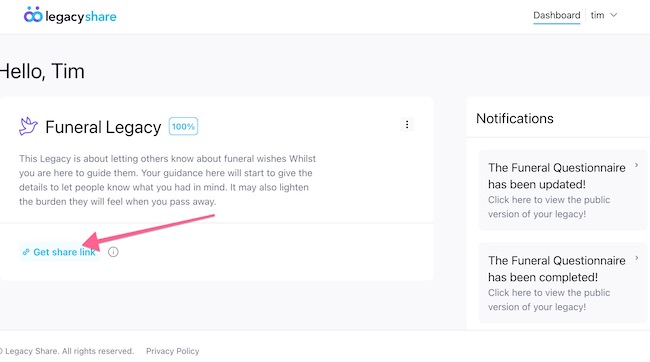
If you need to get the share link, it can be found just under your Legacy.
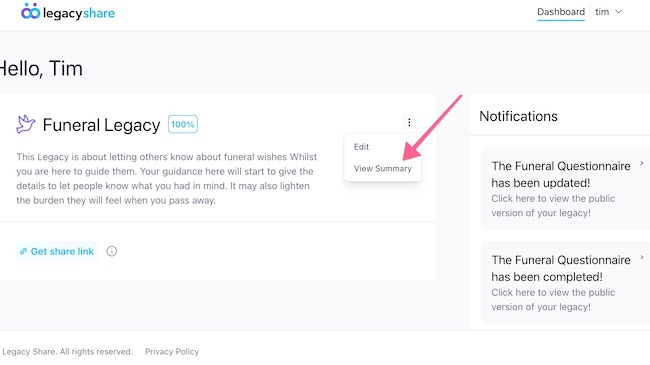
If you want to view your summary or update your Legacy, you can by clicking the elipses menu, this will present you the options to 'View Summary' and 'Edit'.
On the right-hand side, you will see the latest notifications and updates from the Legacy Share team.
Your Profile
From the top right, you can access your profile details from the top right menu (next to your name).
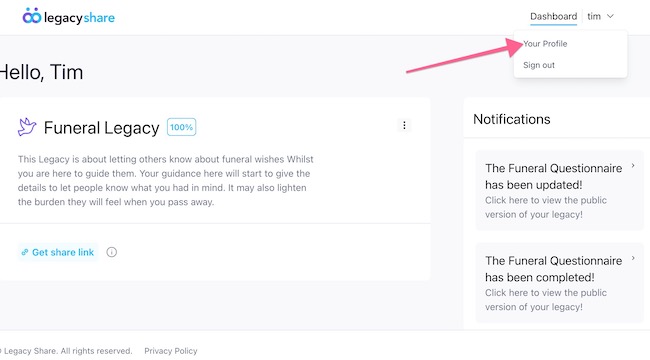
From Your Profile you can update your;
- Name
- Password
- Turn on 2-factor authentication
- Log out of all other sessions of Legacy Share
- Delete account
|
Rate this Topic:
|
|||
|
